How to edit Booth Details (Booth Number, Booth Size, Booth Area, Room Number) of the Exhibitors?
By support
You can directly edit the Booth details by following below mentioned steps.
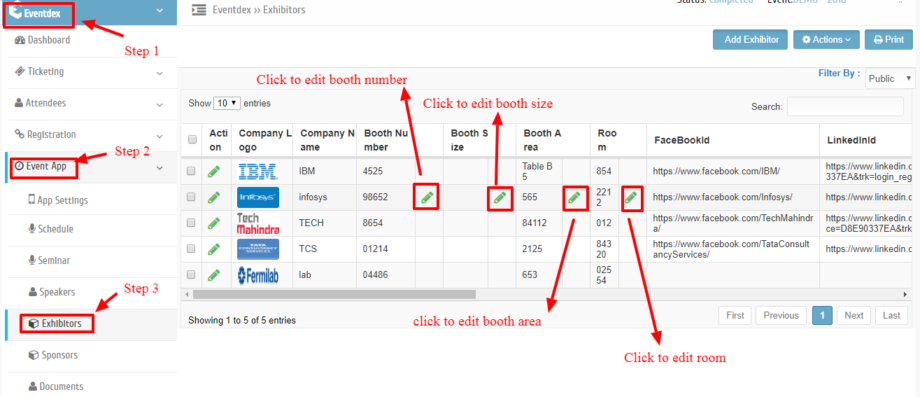
Step 1: Go to “Exhibitors” Section and click on the “Edit” tab of the required Booth field(s) you want to edit.
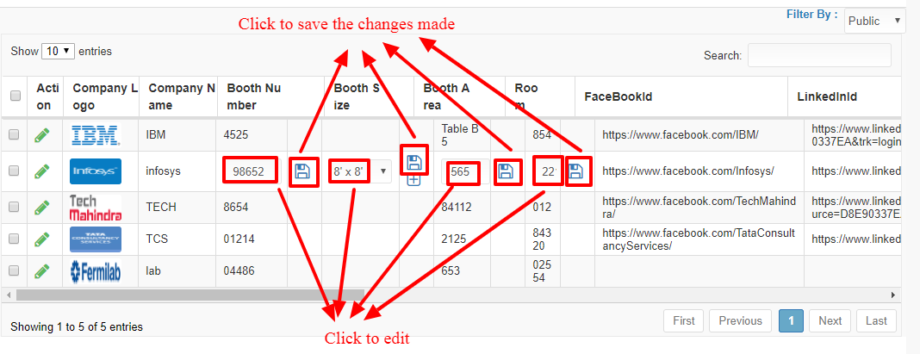
“Step 2: Edit the field(s) and “Save” to confirm the changes.
”
Step 3: Booth size can be added by clicking on the plus icon.
“Step 4: Enter new Booth size in the box and “Save” to confirm it. OR
Click on ” Cancel” button to exit the “New Booth Size” Section without saving changes.”