
How can Exhibitors or Event Admin Add marketing materials like Brochures or Product / Event Details on the App?
By support
Exhibitors or Event Admin can add any marketing materials (Brochures, Promotional Contents, etc.) on the App by following the procedure:
Step 1: Go to Eventdex.com >> Login.
Step 2: Select an Event for which promotional content has to be added.
Step 3: Click on “Lead Retrieval” and from the drop-down menu select “Lead Attachments”.
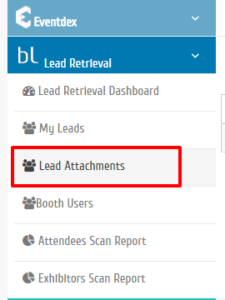
Step 4:“Leads Attachment” page appears on the screen.
Step 5: Click on “Add File” tab.
Step 6:Enter preferred name/title in “Display Label”.

Step 7: Click on “Choose File” tab and upload the desired file (PDF) from the system.

Step 8:Click on “Save” to confirm the details or click on “Cancel” to exit the page. The added file is displayed to the BoothLeads audience.
How to edit/delete the promotional content of the BoothLeads?
To delete the promotional content, click on “Delete” icon given in “Actions” column. The file will not be displayed to the audience.